NBOT Game Settings
YAPMANIZ GEREKEN BOT AYARLARI
19.01.2026 Sorunsuz Çalışmakta
Bot mousenizi kontrol ederek insan oynuyormuş gibi simule etmektedir. Bu durum algılanmayı %99 azaltmaktadır.
CLIENT AYARLARI
- Oyuna indirmiş oldugunuz NBOT Client ile giriş yapın (Oyun açıldıgında güncelleme var derse İPTAL basınız oyun açılıcaktır.)
- İndirmiş olduğunuz WU-NBOT ile Botu açıp satın aldığınızda size özel verilen hesabınıza giriş yapın.
- Botta başlata basmadan Ayarlar sekmesinden "Sadece Ekran Ayari" butonuna basın oyunu sol tarafa taşıyıp küçültecek.
- ÖNEMLİ: Masaüstüne sağ tıklayıp "Görüntü Ayarları" açın. "Metin, uygulama ve diğer öğelerin boyutunu değiştir" seçeneğini %100 (Önerilen) olarak ayarlayın.
- Oyun ayarlarından GRAFİK kısmından hepsi kapalı görüntü en düşükte.
- ARAYÜZ kısmında " Harita Ölçeği Sıfırla Yapıp 1 kere Küçültüyoruz. "
- ARAYÜZ kısmında " Arayüz Ölçeği Sıfırla Yapıp 4 kere Küçültüyoruz. "
- KONTROLLER kısmında Üstteki kapalı Altındaki açık (Cephane tıklayın açık).
- KONTROLLER kısmında Işınlanma tuşu " B " harfi olucak.
- Bütün ayarlar bitmiş durumda bu yapılan ayarlar kayıt olur. Bozmadığınız sürece her girdiğinizde aynı şekilde kalır.
Desteklenen Sistemler
Tüm güncel Windows sürümleri
WarUniverse NBOT
2 Yılı Aşkın Süredir Kesintisiz ve Güvenli Hizmet!
Windows Ekran Ölçeği Ayarı
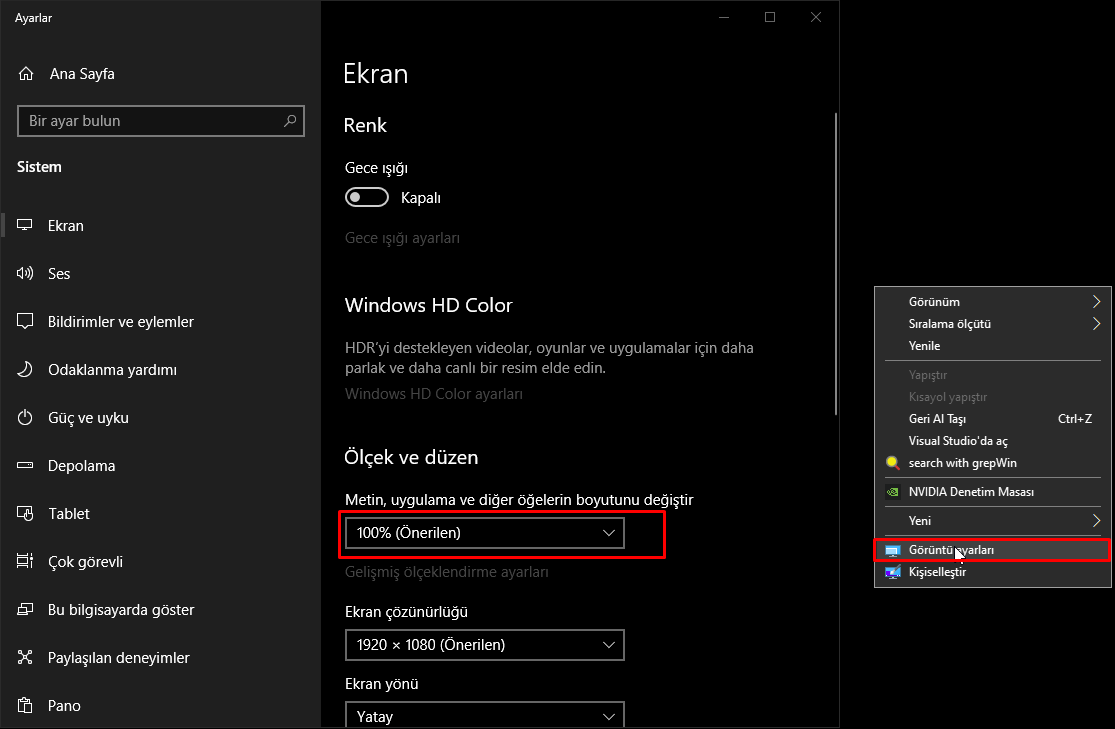
Masaüstüne sağ tıklayarak Görüntü Ayarları'nı açın ve ölçeği %100'e ayarlayın
BOT SETTINGS YOU NEED TO MAKE
19.01.2026 Working Flawlessly
The bot controls your mouse and simulates as if a human is playing. This reduces detection by 99%.
CLIENT SETTINGS
- Launch the game using the NBOT Client you downloaded. (If an update prompt appears, click CANCEL. The game will still open.)
- Open the bot using the WU-NBOT file you downloaded, and log in using the account provided to you upon purchase.
- Before pressing Start on the bot, go to the Settings tab and click the "Only Screen Setup" button. This will move the game to the left side and resize it.
- IMPORTANT: Right-click on the desktop and go to "Display Settings". Set the "Change the size of text, apps, and other items" option to 100% (Recommended).
- In the game settings under GRAPHICS, turn everything OFF and set visuals to the lowest quality.
- In the INTERFACE section, click "Reset Map Scale" and reduce it once.
- Also in the INTERFACE section, click "Reset Interface Scale" and reduce it four times.
- In the CONTROLS section, the top toggle should be OFF, and the bottom one should be ON (Click on Ammunition to activate).
- In the CONTROLS section, the teleport key must be set to "B".
- All these settings will be saved automatically. As long as you don't change them, they'll stay the same every time you open the game.
Supported Systems
All current Windows versions
WarUniverse NBOT
Safe and Continuous Service for Over 2 Years!
Windows Display Scale Settings
Right-click on the desktop and go to Display Settings, then set the scale to 100%